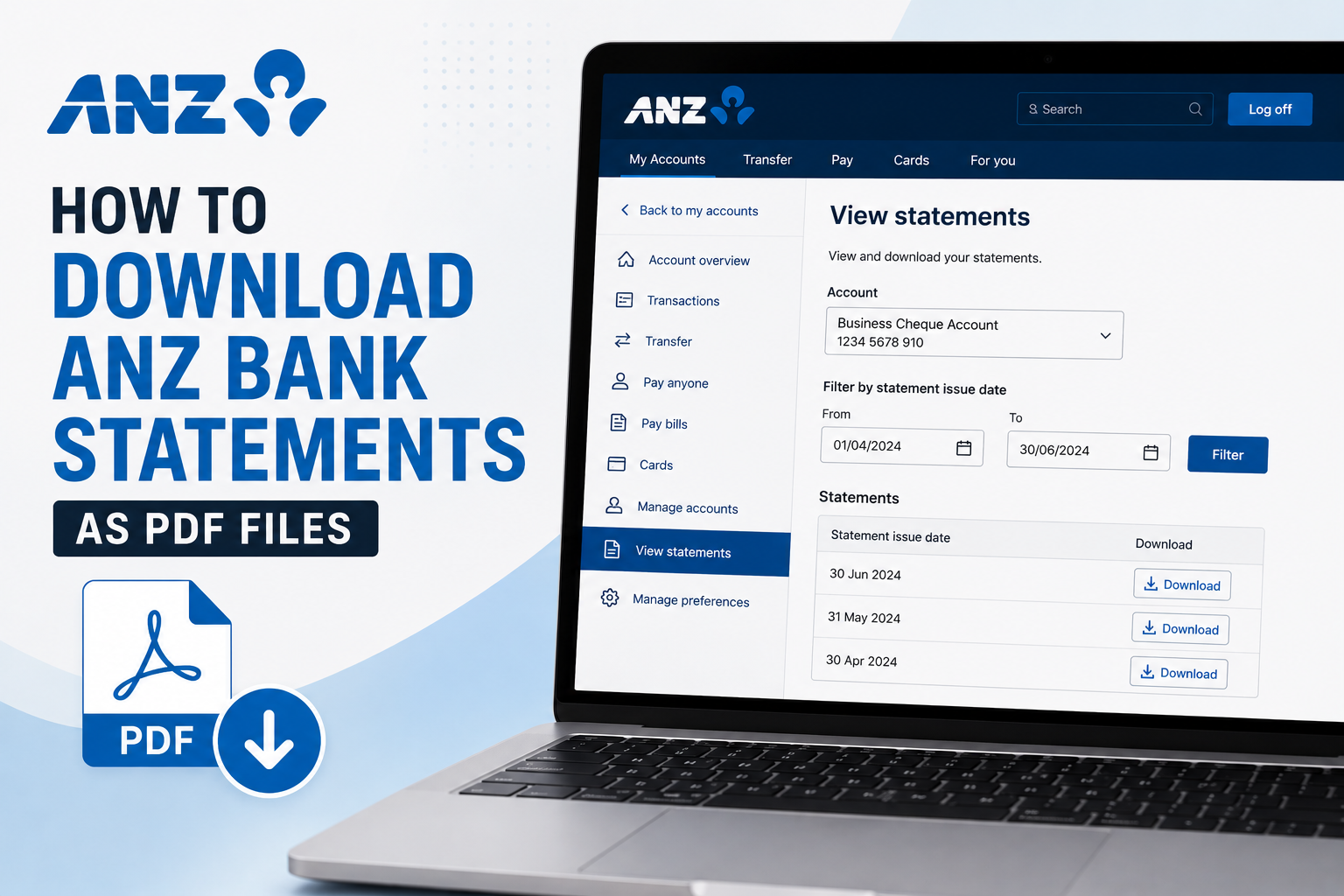
Need to download your ANZ bank statements as PDF files? ANZ Internet Banking lets you access your available monthly account statements online and save them as PDFs to your computer or device. Whether you need your statements for bookkeeping, tax preparation, proof of income, a loan application or simply your financial records, the process only takes a few steps.
In this guide, we'll show you how to download ANZ bank statements as PDF files using ANZ Internet Banking.
Watch the video tutorial below or follow the step-by-step instructions.
How to Download an ANZ Bank Statement as a PDF
Step 1: Log In to ANZ Internet Banking
Start by logging in to your ANZ Internet Banking account. Once you're logged in, select the bank account for which you need statements. If you have several ANZ accounts, make sure you've selected the correct account before continuing.
Step 2: Select View Statements
From the account menu, click View Statements. This will take you to the section where your available ANZ bank account statements are stored.
Step 3: Find the Statements You Need
You should now see a list of your available monthly bank statements. If you're looking for statements from a particular period, you can filter the list using the statement issue date.
For example, if you need statements covering the second quarter of the calendar year, you could enter:
From: 1 April
To: 30 June
Then click Filter. This makes it easier to find the monthly statements relevant to the period you're working with.
Step 4: Download Your ANZ Statements
Once you've found the statements you need, click the Download button next to each statement. Your statements can then be saved as PDF files on your computer or device. If you need statements covering several months, download each relevant monthly statement individually.
That's it! You now have your ANZ bank account statements as PDF files.
Why Download ANZ Bank Statements as PDF Files?
PDF bank statements provide a convenient record of the activity in your account during a particular statement period.
You may need ANZ bank statements for:
Bookkeeping
Tax preparation
BAS preparation
Proof of income
Rental applications
Home loan applications
Business loan applications
Mortgage applications
Financial record keeping
Preparing financial statements
Providing documents to an accountant
For sole traders, freelancers, contractors and gig workers, keeping copies of bank statements can also make it much easier to organize business income and expenses.
ANZ PDF Statements vs CSV Transactions
ANZ allows you to access banking information in different formats, and the best format depends on what you're trying to accomplish.
PDF Bank Statements
A PDF statement is generally the better choice when you need a readable financial document showing your account activity for a specific statement period.
PDF statements can be particularly useful for:
Proof of income
Rental applications
Loan applications
Mortgage applications
Financial record keeping
Providing statements to an accountant or other third party
CSV Transaction Files
CSV is generally more useful when you need to actually process or analyze individual transactions.
CSV transaction files can be used for:
Bookkeeping
Sorting transactions
Expense categorization
Income tracking
Spreadsheet analysis
Importing transactions into compatible financial software
Preparing Profit & Loss statements
If you need transaction data rather than monthly statements, see our separate guide: How to Download ANZ Bank Transactions as a CSV File.
Using ANZ Bank Statements for Bookkeeping
If you use your ANZ account for business activity, your bank statements can be an important source of financial information.
Your transactions may include:
Income
Customer payments
Gig platform payouts
Client payments
Marketplace deposits
Other business revenue
Expenses
Fuel
Vehicle expenses
Software subscriptions
Advertising
Phone and internet
Insurance
Equipment
Professional services
Bank fees
Other operating expenses
To prepare your bookkeeping records, these transactions need to be reviewed and categorized correctly.
Turn Your ANZ Bank Statements Into a Profit & Loss Statement
Downloading your statements may only be the first step if your ultimate goal is to prepare financial records.
A Profit & Loss statement, also known as a P&L or income statement, summarizes your business income and expenses over a specific period and shows whether the business generated a profit or loss.
Creating one manually can involve:
Collecting your ANZ bank statements.
Reviewing every transaction.
Separating personal and business transactions.
Identifying business income.
Categorising business expenses.
Calculating totals for each category.
Calculating your net profit.
Building the final P&L statement.
If your account contains hundreds of transactions, this can take considerable time.
Accounting Samurai can help simplify the process.
Instead of manually transferring transactions into a spreadsheet, you can use your bank and card statements to generate an organised Profit & Loss statement more efficiently.
This can be particularly useful for:
Uber drivers
Rideshare drivers
Uber Eats and DoorDash drivers
Amazon Flex drivers
Gig workers
Freelancers
Contractors
Sole traders
Small business owners
Generate a P&L From Your Bank Statements
Already downloaded your ANZ statements?
Upload your bank or card statements to Accounting Samurai and turn your transactions into an organized Profit & Loss statement without manually building one from scratch.
👉 Generate Your Free Profit & Loss Statement Now
Frequently Asked Questions
Can I download ANZ bank statements online?
Yes. Available account statements can be accessed through ANZ Internet Banking. Select the relevant account and navigate to View Statements to find your available statements.
Can I download ANZ bank statements as PDF files?
Yes. Once you've located the monthly statement you need, use the available Download option to save the statement as a PDF file.
How do I find old ANZ bank statements?
Log in to ANZ Internet Banking, select the relevant account and open View Statements. You can filter your available statements by issue date to find statements from a particular period.
Can I download multiple ANZ bank statements?
If you need statements covering several months, locate the relevant period and download each monthly statement you require.
Can I choose a custom date range for an ANZ PDF statement?
ANZ bank statements are issued for defined statement periods. Filtering by date helps you find statements issued during a particular period, but it does not necessarily create a new PDF statement for an arbitrary custom date range.
If you need individual transactions for an exact custom period, downloading your ANZ transactions as a CSV file may be more appropriate.
Can I use ANZ bank statements as proof of income?
Bank statements are commonly requested as supporting financial documents for situations such as rental applications, loans and mortgages. However, the exact documents accepted depend on the lender, landlord or organization requesting proof of income.
Self-employed people may also be asked to provide tax returns, financial statements or a Profit & Loss statement.
Can I create a Profit & Loss statement from ANZ bank statements?
Yes. You can review the transactions contained in your statements, separate business and personal activity, categorize your income and expenses, and use the resulting figures to prepare a P&L statement.
Alternatively, you can use a tool such as Accounting Samurai to reduce the amount of manual transaction processing required.